
実現する機能
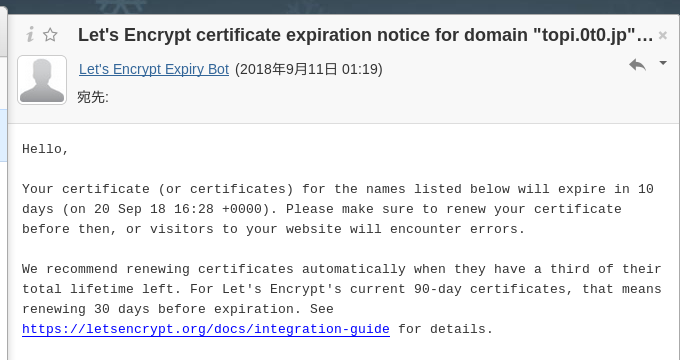
インターネット上での身分証明書にあたるssl証明書は、高額で手が出ませんが、時代は確実にssl証明書無しではサイトにすら来てもらえない厳しい時代に突入していることは確かです。そこで、無料で利用できる自動化されていてオープンな認証局(CA)、Let’s Encrypt という外部認証局から無料のssl証明書を取得して運用しているのですが、下図の自動更新ができないとのメールが飛んできました。(画像はクリックすると拡大表示されます。以下同じ)
以下は、そのエラー潰しの備忘録です。
前提の環境
Let’s EncryptがInstall済みであること
以下の黒背景部分はGNOME端末を表示しています。紫色はキーボードから入力するコマンド(コピペした方が楽ですが、コマンドは覚えられません)、緑はコマンドや処理内容の説明、白は自動表示する部分、赤は注意書きです。「tu」部分はあなたのUser名に置き換えてください。
ssl証明書を個別に再度設定してみる
#「topi.0t0.jp」のssl証明書を個別に設定 [root@ufuso ~]# certbot Saving debug log to /var/log/letsencrypt/letsencrypt.log Plugins selected: Authenticator nginx, Installer nginx Starting new HTTPS connection (1): acme-v01.api.letsencrypt.org Which names would you like to activate HTTPS for? ------------------------------------------------------------------------------- 1: topi.0t0.jp 2: ufuso.dip.jp 3: ufuso.org ------------------------------------------------------------------------------- Select the appropriate numbers separated by commas and/or spaces, or leave input blank to select all options shown (Enter 'c' to cancel): 1 Cert is due for renewal, auto-renewing... Renewing an existing certificate Performing the following challenges: tls-sni-01 challenge for topi.0t0.jp Waiting for verification... Cleaning up challenges Failed authorization procedure. topi.0t0.jp (tls-sni-01): urn:acme:error:unauthorized :: The client lacks sufficient authorization :: Incorrect validation certificate for tls-sni-01 challenge. Requested f25953eda98e352e941a88db3c4cdda9.ed89753aea2f88a77434c43de7dd7630.acme.invalid from 60.92.88.148:443. Received 1 certificate(s), first certificate had names "ufuso.dip.jp" IMPORTANT NOTES: - The following errors were reported by the server: Domain: topi.0t0.jp Type: unauthorized Detail: Incorrect validation certificate for tls-sni-01 challenge. Requested f25953eda98e352e941a88db3c4cdda9.ed89753aea2f88a77434c43de7dd7630.acme.invalid from 60.92.88.148:443. Received 1 certificate(s), first certificate had names "ufuso.dip.jp" #下の朱書き部分から、エラー原因は番号とドメイン名の不一致。3についても同じ エラーが出た。原因特定は先送りしてエラーの解消から To fix these errors, please make sure that your domain name was entered correctly and the DNS A/AAAA record(s) for that domain contain(s) the right IP address. #ドメイン「dip.jp」は登録が多いので登録制限中らしく、2は元々証明書 を得られていなかった。 An unexpected error occurred: There were too many requests of a given type :: Error creating new cert :: too many certificates already issued for: dip.jp Please see the logfiles in /var/log/letsencrypt for more details. |
SSL/TLS サーバ証明書の取得
#certbotはLet's Encryptを利用するためのコマンド、 authenticatorは証明書 取得のPlugin、standaloneは証明書を必要とするWebServerを使って証明書を取得、 --installer nginxはnginxに証明書を自動でInstall、-d ufuso.dip.jp はドメイ ン証明書を取得するDomainの指定、--pre-hook "systemctl stop nginx"は取得前 にnginを゜stop、 --post-hook "systemctl start nginx"は取得後にnginxをstart [root@ufuso ~]# certbot --authenticator standalone --installer nginx -d ufuso.dip.jp --pre-hook "systemctl stop nginx" --post-hook "systemctl start nginx" Saving debug log to /var/log/letsencrypt/letsencrypt.log Plugins selected: Authenticator standalone, Installer nginx Starting new HTTPS connection (1): acme-v01.api.letsencrypt.org Cert not yet due for renewal You have an existing certificate that has exactly the same domains or certificate name you requested and isn't close to expiry. (ref: /etc/letsencrypt/renewal/ufuso.dip.jp.conf) What would you like to do? #再Installなので「1」を入力してエンターキー押下。 ------------------------------------------------------------------------------- 1: Attempt to reinstall this existing certificate 2: Renew & replace the cert (limit ~5 per 7 days) ------------------------------------------------------------------------------- Select the appropriate number [1-2] then [enter] (press 'c' to cancel): 1 Keeping the existing certificate Deployed Certificate to VirtualHost /etc/nginx/nginx.conf for set(['ufuso.dip.jp']) Please choose whether or not to redirect HTTP traffic to HTTPS, removing HTTP access. #常にHTTPSでの接続をするので「2」を入力してエンターキー押下。 ------------------------------------------------------------------------------- 1: No redirect - Make no further changes to the webserver configuration. 2: Redirect - Make all requests redirect to secure HTTPS access. Choose this for new sites, or if you're confident your site works on HTTPS. You can undo this change by editing your web server's configuration. ------------------------------------------------------------------------------- Select the appropriate number [1-2] then [enter] (press 'c' to cancel): 2 Traffic on port 80 already redirecting to ssl in /etc/nginx/nginx.conf ------------------------------------------------------------------------------- Congratulations! You have successfully enabled https://ufuso.dip.jp You should test your configuration at: https://www.ssllabs.com/ssltest/analyze.html?d=ufuso.dip.jp ------------------------------------------------------------------------------- IMPORTANT NOTES: - Congratulations! Your certificate and chain have been saved at: /etc/letsencrypt/live/ufuso.dip.jp/fullchain.pem Your key file has been saved at: /etc/letsencrypt/live/ufuso.dip.jp/privkey.pem Your cert will expire on 2018-12-10. To obtain a new or tweaked version of this certificate in the future, simply run certbot again with the "certonly" option. To non-interactively renew *all* of your certificates, run "certbot renew" - If you like Certbot, please consider supporting our work by: Donating to ISRG / Let's Encrypt: https://letsencrypt.org/donate Donating to EFF: https://eff.org/donate-le #ドメイン「dip.jp」は登録が多いので登録制限中のため証明書を取得できなかった のだが、今回はなぜだかできてしまった。理由は不明 |
ssl証明書の取得でnginxの設定が自動変更されたようなので内容を確認
#nginxの設定ファイルを開く。設定の手法とドメインの順番を変えたせいか全体的 に自動修正されている。 [root@ufuso ~]# vi /etc/nginx/nginx.conf #user nginx; user apache; #worker_processes 1; worker_processes auto; error_log /var/log/nginx/error.log warn; pid /var/run/nginx.pid; events { worker_connections 1024; use epoll; #I/O多重化指定 } http { include /etc/nginx/mime.types; default_type application/octet-stream; log_format main '$remote_addr - $remote_user [$time_local] "$request" ' '$status $body_bytes_sent "$http_referer" ' '"$http_user_agent" "$http_x_forwarded_for"'; access_log /var/log/nginx/access.log main; sendfile on; #tcp_nopush on; keepalive_timeout 65; gzip on; include /etc/nginx/conf.d/*.conf; server { listen 80 ; listen [::]:80; #通信の暗号化(ssl)。rainloopはhttps://接続なので必要 listen 443 ssl http2; #Webサーバーの指定 server_name ufuso.org; #Webフォルダの指定 #root /var/www/html; root /usr/share/nginx/html; index index.php index.html index.htm; #暗号化方式の指定 ssl_protocols TLSv1 TLSv1.1 TLSv1.2; #サーバのSSL暗号設定をクライアントのそれより優先 ssl_prefer_server_ciphers on; #暗号技術の組み合わせを指定 ssl_ciphers ECDHE+RSAGCM:ECDH+AESGCM:DH+AESGCM:ECDH+AES256:DH+AES256:ECDH+AES128:DH+AES:!aNULL!eNull:!EXPORT:!DES:!3DES:!MD5:!DSS; #自己証明書の場所を入力(事例はmod-sslの場合) ssl_certificate /etc/letsencrypt/live/ufuso.org/fullchain.pem; # managed by Certbot #秘密鍵の場所を入力(事例はmod-sslの場合) ssl_certificate_key /etc/letsencrypt/live/ufuso.org/privkey.pem; # managed by Certbot if ($scheme != "https") { return 301 https://$host$request_uri; } # managed by Certbot } server { listen 80 default_server; listen [::]:80 default_server; #通信の暗号化(ssl)。rainloopはhttps://接続なので必要 listen 443 ssl http2; #Webサーバーの指定 server_name ufuso.dip.jp; #Webフォルダの指定 root /var/www/html; #root /usr/share/nginx/html; index index.php index.html index.htm; #暗号化方式の指定 ssl_protocols TLSv1 TLSv1.1 TLSv1.2; #サーバのSSL暗号設定をクライアントのそれより優先 ssl_prefer_server_ciphers on; #暗号技術の組み合わせを指定 ssl_ciphers ECDHE+RSAGCM:ECDH+AESGCM:DH+AESGCM:ECDH+AES256:DH+AES256:ECDH+AES128:DH+AES:!aNULL!eNull:!EXPORT:!DES:!3DES:!MD5:!DSS; #自己証明書の場所を入力(事例はmod-sslの場合) ssl_certificate /etc/letsencrypt/live/ufuso.dip.jp/fullchain.pem; # managed by Certbot #秘密鍵の場所を入力(事例はmod-sslの場合) ssl_certificate_key /etc/letsencrypt/live/ufuso.dip.jp/privkey.pem; # managed by Certbot if ($scheme != "https") { return 301 https://$host$request_uri; } # managed by Certbot # Load configuration files for the default server block. include /etc/nginx/default.d/*.conf; #phpを使うための設定。fastcgi経由なのでその設定がメイン location ~ \.php$ { include /etc/nginx/fastcgi_params; fastcgi_pass 127.0.0.1:9000; fastcgi_index index.php; fastcgi_param SCRIPT_FILENAME $document_root$fastcgi_script_name; } error_page 404 /404.html; location = /40x.html { } error_page 500 502 503 504 /50x.html; location = /50x.html { } } server { listen 443 ssl http2; server_name topi.0t0.jp; #クライアントがアクセスするURL proxy_set_header X-Forwarded-For $proxy_add_x_forwarded_for; proxy_set_header Host $http_host; location / { proxy_pass https://192.168.24.240; #ウェブサーバーBのIPアドレス } ssl_certificate /etc/letsencrypt/live/topi.0t0.jp/fullchain.pem; # managed by Certbot ssl_certificate_key /etc/letsencrypt/live/topi.0t0.jp/privkey.pem; # managed by Certbot } |
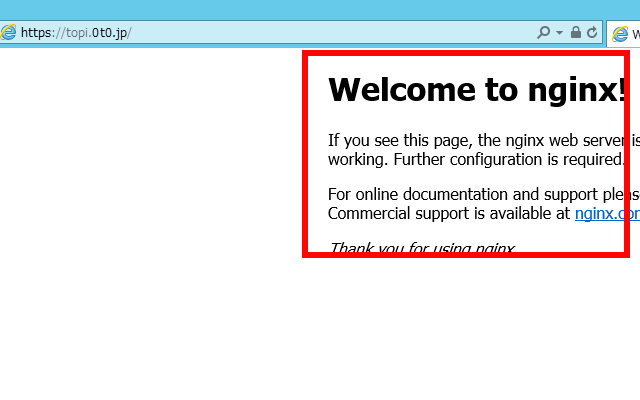
職場から自宅サーバーにアクセスできたので、一定の公証力はあるようです
ssl証明書自動更新の設定(crontab)
#自動更新コマンドの実行(更新時期30日未満になると更新) [root@ufuso ~]# certbot renew --pre-hook "systemctl stop nginx" --post-hook "systemctl start nginx" Saving debug log to /var/log/letsencrypt/letsencrypt.log ------------------------------------------------------------------------------- Processing /etc/letsencrypt/renewal/topi.0t0.jp.conf ------------------------------------------------------------------------------- Cert not yet due for renewal ------------------------------------------------------------------------------- Processing /etc/letsencrypt/renewal/ufuso.org.conf ------------------------------------------------------------------------------- Cert not yet due for renewal ------------------------------------------------------------------------------- Processing /etc/letsencrypt/renewal/ufuso.dip.jp.conf ------------------------------------------------------------------------------- Cert not yet due for renewal #更新時期30日未満ではないので更新しないが、結果は成功 ------------------------------------------------------------------------------- The following certs are not due for renewal yet: /etc/letsencrypt/live/topi.0t0.jp/fullchain.pem (skipped) /etc/letsencrypt/live/ufuso.org/fullchain.pem (skipped) /etc/letsencrypt/live/ufuso.dip.jp/fullchain.pem (skipped) No renewals were attempted. No hooks were run. ------------------------------------------------------------------------------- #crontabに設定を追加する。 [root@ufuso~]# vi /etc/crontab SHELL=/bin/bash PATH=/sbin:/bin:/usr/sbin:/usr/bin MAILTO=root # For details see man 4 crontabs # Example of job definition: # .---------------- minute (0 - 59) # | .------------- hour (0 - 23) # | | .---------- day of month (1 - 31) # | | | .------- month (1 - 12) OR jan,feb,mar,apr ... # | | | | .---- day of week (0 - 6) (Sunday=0 or 7) OR sun,mon,tue,wed,thu,fri,sat # | | | | | # * * * * * user-name command to be executed #毎週日曜の午前5時に更新するように設定。「-q」でログ出力を省略。 apacheを使用なら「nginx」を「httpd」に変更 0 5 * * 0 root certbot renew -q --pre-hook "service nginx stop" --post-hook "service nginx start" |
以上