実現する機能
迷惑メール激増のため、自宅に構築したメールサーバーから送信することが日々困難になってきています。インターネットプロバイダの監視が厳しくなり、知らない間に送信拒否の措置が取られていたり、相手側メールサーバーから不審者扱いされて受信を拒否されたりするからです。
こういう現状でも自宅にメールサーバーを構築するメリットは、
メールアドレスを自由に決められる
添付ファイルの制限も大幅に緩和できる
yahoo、gmail、hotmailすべてを自宅サーバーに転送させて一度に確認できる
ことです。
構築するサーバーは、送信メールサーバー(SMTPサーバー)と受信メールサーバー(POP/IMAPサーバー)です。送信メールサーバーにはPostfix、受信メールサーバーにはDovecotを採用しています。
ただ、自宅のメールサーバーは迷惑メールの不正中継に利用されやすいので、インターネットを使って送信できないようになっています。そこで、どこにでも自由にメールを送信できるようにするため、SMTP-Auth機能も構築しました。
また、DovecotはPOP/IMAPサーバーとして構築し、ユーザがPOPまたはIMAPを選択できるようにしました。※POPとIMAPの違い
※SMTP-Auth機能とは、メール送信時にインターネットプロバイダのユーザ名とパスワードで認証を行なう機能で、迷惑メールの不正中継に利用されないためのものです。auのひかりちゅらをプロバイダで使っていますが、問題なく外部へメール送信ができます。これで内外への送受信が集中管理できるので便利です。
Postfixの導入手順
(1)Postfix設定
[root@ufuso ~]# vi /etc/postfix/main.cf ← Postfix設定ファイル編集
# INTERNET HOST AND DOMAIN NAMES
#
# The myhostname parameter specifies the internet hostname of this
# mail system. The default is to use the fully-qualified domain name
# from gethostname(). $myhostname is used as a default value for many
# other configuration parameters.
#
#myhostname = host.domain.tld
#myhostname = virtual.domain.tld
myhostname = ufuso.dip.jp ← 追加(自FQDN名を指定)

# The mydomain parameter specifies the local internet domain name.
# The default is to use $myhostname minus the first component.
# $mydomain is used as a default value for many other configuration
# parameters.
#
#mydomain = domain.tld
mydomain = ufuso.dip.jp ← 追加(自ドメイン名を指定)

# SENDING MAIL
#
# The myorigin parameter specifies the domain that locally-posted
# mail appears to come from. The default is to append $myhostname,
# which is fine for small sites.  If you run a domain with multiple
# machines, you should (1) change this to $mydomain and (2) set up
# a domain-wide alias database that aliases each user to
# user@that.users.mailhost.
#
# For the sake of consistency between sender and recipient addresses,
# myorigin also specifies the default domain name that is appended
# to recipient addresses that have no @domain part.
#
#myorigin = $myhostname
myorigin = $mydomain ← 行頭の#を削除。ローカルからのメール送信時の送信元メール
アドレス@以降にドメイン名を付加

# RECEIVING MAIL

# The inet_interfaces parameter specifies the network interface
# addresses that this mail system receives mail on.  By default,
# the software claims all active interfaces on the machine. The
# parameter also controls delivery of mail to user@[ip.address].
#
# See also the proxy_interfaces parameter, for network addresses that
# are forwarded to us via a proxy or network address translator.
#
# Note: you need to stop/start Postfix when this parameter changes.
#
inet_interfaces = all ← 行頭の#を削除(外部からのメール受信を許可)
#inet_interfaces = $myhostname
#inet_interfaces = $myhostname, localhostl
#inet_interfaces = localhost ← 行頭に#を付加

# STANDARD_CONFIGURATION_README).
#
# The local machine is always the final destination for mail addressed
# to user@[the.net.work.address] of an interface that the mail system
# receives mail on (see the inet_interfaces parameter).
#
# Specify a list of host or domain names, /file/name or type:table
# patterns, separated by commas and/or whitespace. A /file/name
# pattern is replaced by its contents; a type:table is matched when
# a name matches a lookup key (the right-hand side is ignored).
# Continue long lines by starting the next line with whitespace.
#
# See also below, section "REJECTING MAIL FOR UNKNOWN LOCAL USERS".
#
#mydestination = $myhostname, localhost.$mydomain, localhost
 ← 行頭に#を付加して無効にする
mydestination = $myhostname, localhost.$mydomain, localhost, $mydomain
 ← 行頭の#を削除(自ドメイン宛メールを受信できるようにする)
#mydestination = $myhostname, localhost.$mydomain, localhost, $mydomain,
#       mail.$mydomain, www.$mydomain, ftp.$mydomain

# DELIVERY TO MAILBOX
#
# The home_mailbox parameter specifies the optional pathname of a
# mailbox file relative to a user's home directory. The default
# mailbox file is /var/spool/mail/user or /var/mail/user.  Specify
# "Maildir/" for qmail-style delivery (the / is required).
#
#home_mailbox = Mailbox
home_mailbox = Maildir/ ← 行頭の#を削除(メールボックス形式をMaildir形式にする)

# SHOW SOFTWARE VERSION OR NOT
#
# The smtpd_banner parameter specifies the text that follows the 220
# code in the SMTP server's greeting banner. Some people like to see
# the mail version advertised. By default, Postfix shows no version.
#
# You MUST specify $myhostname at the start of the text. That is an
# RFC requirement. Postfix itself does not care.
#
#smtpd_banner = $myhostname ESMTP $mail_name
#smtpd_banner = $myhostname ESMTP $mail_name ($mail_version)
smtpd_banner = $myhostname ESMTP unknown ← 追加(メールサーバーソフト名の隠蔽化)

以下を最終行へ追加(SMTP-Auth設定)

smtpd_sasl_auth_enable = yes
smtpd_sasl_local_domain = $myhostname
smtpd_recipient_restrictions =
    permit_mynetworks
    permit_sasl_authenticated
    reject_unauth_destination


[root@ufuso ~]# systemctl restart postfix ← postfix再起動

[root@ufuso ~]# systemctl enable postfix ← postfix自動起動設定
|
(2)SMTP-Auth設定
SMTP-Auth用ユーザ名、パスワードにシステムのユーザ名、パスワードを使用する場合)
[root@ufuso ~]# systemctl start saslauthd ← saslauthd起動 [root@ufuso ~]# systemctl enable saslauthd ← saslauthd自動起動設定 ln -s '/usr/lib/systemd/system/saslauthd.service' '/etc/systemd/system/multi-user.target.wants/saslauthd.service' [root@ufuso ~]# systemctl restart postfix ← postfix再起動 saslauthdが入っていなければ yum install cyrus-sasl cyrus-sasl-plain |
Dovecotの導入手順
(1)Dovecotインストール
[root@ufuso ~]# yum -y install dovecot ← Dovecotインストール インストール: dovecot.x86_64 1:2.2.10-4.el7_0.1 完了しました! [root@ufuso ~]# vi /etc/dovecot/dovecot.conf ← Dovecotの設定 # A comma separated list of IPs or hosts where to listen in for connections. # "*" listens in all IPv4 interfaces, "::" listens in all IPv6 interfaces. # If you want to specify non-default ports or anything more complex, # edit conf.d/master.conf. #listen = *, :: listen = * ← 追記。IPv6を無効化 [root@ufuso ~]# vi /etc/dovecot/conf.d/10-auth.conf ← 認証の設定 # Disable LOGIN command and all other plaintext authentications unless # SSL/TLS is used (LOGINDISABLED capability). Note that if the remote IP # matches the local IP (ie. you're connecting from the same computer), the # connection is considered secure and plaintext authentication is allowed. # See also ssl=required setting. #disable_plaintext_auth = yes disable_plaintext_auth = no ← 追記。プレーンテキスト認証も許可 # Space separated list of wanted authentication mechanisms: # plain login digest-md5 cram-md5 ntlm rpa apop anonymous gssapi otp skey # gss-spnego # NOTE: See also disable_plaintext_auth setting. auth_mechanisms = plain login ← ログイン認証も許可 [root@ufuso ~]# vi /etc/dovecot/conf.d/10-mail.conf ← Dovecotの設定 # See doc/wiki/Variables.txt for full list. Some examples: # # mail_location = maildir:~/Maildir # mail_location = mbox:~/mail:INBOX=/var/mail/%u # mail_location = mbox:/var/mail/%d/%1n/%n:INDEX=/var/indexes/%d/%1n/%n # # |
(2)ポート110番(POPの場合)または143番(IMAPの場合)のOPEN
ルーター側の設定でポート110番(POPの場合)または143番(IMAPの場合)をOPENにします。
※ルーターの設定は各ルーターのマニュアルまたはメーカー別ルーターポート開放手順を参照
ポートチェック【外部からポート開放確認】で「host名」にサーバー名(例:ufuso.jp)、「port番号」に110(POPの場合)または143(IMAPの場合)と入力して「ポートチェック」ボタン押下し、「ホスト=ufuso.jp ポート=110(POPの場合)または143(IMAPの場合) にアクセスできました。」と表示されることを確認。
OP25B対策(SMTP-Auth機能)
(1)Postfix設定
[root@ufuso ~]# vi /etc/postfix/main.cf ← メイン設定の編集 # INTERNET OR INTRANET # The relayhost parameter specifies the default host to send mail to # when no entry is matched in the optional transport(5) table. When # no relayhost is given, mail is routed directly to the destination. # # On an intranet, specify the organizational domain name. If your # internal DNS uses no MX records, specify the name of the intranet # gateway host instead. # # In the case of SMTP, specify a domain, host, host:port, [host]:port, # [address] or [address]:port; the form [host] turns off MX lookups. # # If you're connected via UUCP, see also the default_transport parameter. # #relayhost = $mydomain #relayhost = [gateway.my.domain] #relayhost = [mailserver.isp.tld] #relayhost = uucphost #relayhost = [an.ip.add.ress] relayhost = [auth.au-hikari.ne.jp]:587 ← プロバイダのSMTPサーバーを指定 以下を最終行へ追記 smtp_sasl_auth_enable = yes smtp_sasl_password_maps = hash:/etc/postfix/authinfo smtp_sasl_security_options = noanonymous smtp_sasl_mechanism_filter = LOGIN |
(2)SMTP認証情報設定
[root@ ~]# echo [auth.au-hikari.ne.jp]:587 ユーザー名@at.au-hikari.ne.jp:パスワード > /etc/postfix/authinfo ← SMTP認証情報設定 SMTPサーバー名・・・プロバイダのSMTPサーバー名 ユーザー名・・・プロバイダのメールアカウント名 @at.au-hikari.ne.jp・・・ご自分のメールアカウント名の@以降の部分 パスワード・・・プロバイダのメールパスワード [root@ ~]# chmod 640 /etc/postfix/authinfo ← root以外参照できないようにパーミッション変更 [root@ ~]# postmap /etc/postfix/authinfo ← authinfo.db作成 |
(3)Postfix設定反映
[root@ ~]# systemctl restart postfix ← Postfix設定反映 |
(4)Evolution を使ったメールの送受信確認
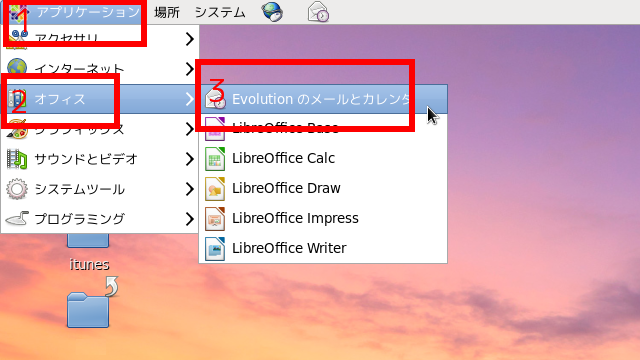
赤枠1の「アプリケーション」をクリックして、表示される一覧から「オフィス」をクリック、さらに表示される一覧から「Evolution のメールとカレンダー」をクリックします。
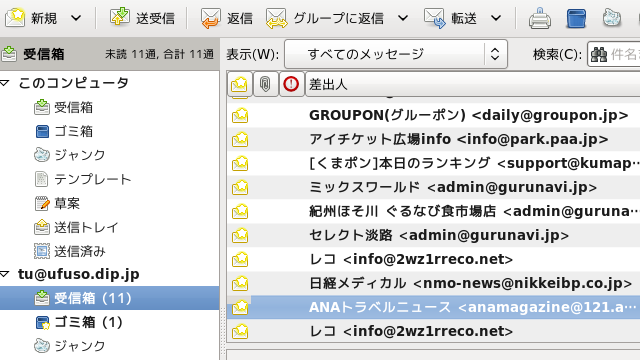
Evolutionの画面
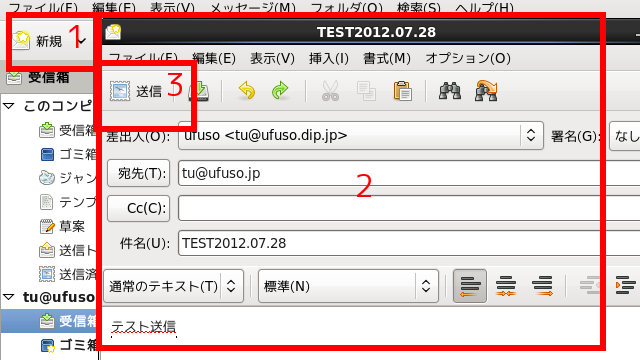
赤枠1の「新規」をクリックすると、赤枠2の画面が表示されるので、必要事項を入力して赤枠3の「送信」をクリックします。